Today, while troubleshooting application connectivity issues for a customer, we uncovered a problem that initially looked like an application or network issue but ultimately turned out to be a faulty ESXi network driver.
The environment was experiencing intermittent connectivity problems affecting virtual machine workloads. Users reported slow application response times, increased latency, and occasional connection instability.
After deeper analysis, the root cause was traced back to a new known issue affecting specific Broadcom NetXtreme E Series network adapters running older versions of the VMware ESXi bnxtnet driver.
Symptoms Observed
The affected ESXi hosts showed several indicators of network degradation:
- Excessive packet drops
- Increased latency between applications
- High numbers of TCP retransmissions
- Reduced network throughput
- RX Queue related errors reported by the bnxtnet driver in vmkernel.log
While the infrastructure remained operational, application performance was significantly impacted because dropped packets forced retransmissions and increased communication delays between systems.
Root Cause
The issue affects Broadcom NetXtreme E Series adapters using certain driver versions.
Affected NIC Models
- BCM5741x
- BCM5750x
- BCM5760x
Affected Driver Version
- bnxtnet v236.1.128.0
- Affected ESX Releases: ESXi 8.x, ESXi 7.x
- Potentially relevant for future ESX 9.0 deployments using the same driver family
- ESX 9.1 is shipped with the non affected 232.x release, but typically the Broadcom compatbility matrix suggests using version 238.x
The faulty driver can lead to packet drops under load, causing network instability and degraded application performance.
How We Identified the Problem
When investigating packet loss in a virtualized environment, the focus is typically on:
- Physical switching infrastructure
- Physical ESX VMNIC Portissues
- Virtual machine configuration incl. vmxnet3 config
- Routing or Firewall paket drops
In this case, packet captures and performance analysis revealed a growing number of retransmissions. Further investigation of the ESXi hosts uncovered RX queue related messages in the vmkernel logs pointing directly to the bnxtnet driver.
You can view ESX paketloss statistics using different approaches:
- vCenter ESX Host Monitor performance (Advanced View)
- VCF Operations for Networks
- ESXCLI network nic stats get -n vmnic[X], Example output below:
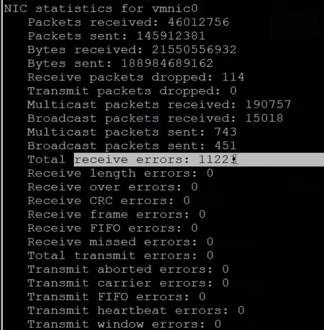
Additionally the ESXi Host's vmkernel log showed a huge amount of network driver warnings like below

This helped narrow down the root cause and avoided unnecessary troubleshooting efforts across other layers of the stack.
Resolution
The recommended mitigation is straightforward:
1. Upgrade the Broadcom Driver
Update the bnxtnet driver to:
Version 238.1.222.x or newer
2. Update Network Adapter Firmware
Ensure the NIC firmware is updated to the latest version provided by your hardware vendor:
- Dell Version 36.11.55.00 or newer
- Lenovo Version 237.1.148.0 or newer
- HPE Version 237.1.144.0 or newer
- Other OEM manufacturers
Updating both the driver and firmware is important to avoid compatibility issues and benefit from the latest stability fixes.
Driver Download
Broadcom provides the latest ESXi network drivers through its support portal:
Download Broadcom ESXi Drivers
Official Broadcom Knowledge Base
Broadcom has now published an official Knowledge Base article documenting this issue:
Excessive packet drops reported on ESXi 8.0.3 with Broadcom 25Gb NICs
The publication of this KB confirms the behavior observed during customer troubleshooting and provides additional guidance for affected environments.
Recommendations for VMware Administrators
If your environment uses Broadcom NetXtreme E Series adapters and you are experiencing unexplained network performance issues, don't limit your investigation to the application or virtual machine layer.
Review:
- Installed bnxtnet driver version
- Network adapter firmware version
- vmkernel.log messages
- Packet drop statistics
- TCP retransmission rates
A simple driver update could resolve issues that otherwise lead to lengthy and frustrating troubleshooting efforts.
Final Thoughts
As infrastructure becomes increasingly software-defined, driver quality remains a critical component of overall platform stability. Even in highly resilient VMware Cloud Foundation and vSphere environments, a faulty network driver can introduce application outages, latency, and performance degradation that are difficult to diagnose.
This case serves as a good reminder that keeping ESXi drivers and firmware up to date is just as important as patching the hypervisor itself.
At comdivision, we regularly help customers identify and resolve performance issues across VMware Cloud Foundation, vSphere, NSX, and vSAN environments. Sometimes the root cause is complex, and sometimes it's as simple as a network driver that needs an update.
.png?width=1153&height=769&name=Untitled%20design%20(9).png)